Thursday, October 23, 2014

What is Parallel Approval Routing in Salesforce?

What is Parallel Approval Routing in Salesforce?


– Send approval requests to multiple approvers in a single step Wait for approval from all the approvers or wait for approval from any one
– Configure an approval step to request approval from any combination of multiple users and related users
– Configure 25 parallel approvers at each step


Approval Process Checklist in Salesforce.

Approval Process Checklist in Salesforce.


Use the following checklist to plan your approval process:
– Prepare an Approval Request Email
– Determine the Approval Request Sender
– Determine the Assigned Approver
– Determine the Delegated Approver
– Decide if your approval process needs a filter
– Decide initial submission actions
– Decide if users can approve requests from a wireless device
– Determine if users can edit records that are awaiting approval
– Decide if records should be auto-approved or rejected
– Determine how many levels your process has
– Determine the actions when an approval request is approved or rejected


Scrum & Agile Basics, Salesforce development methodology.

Scrum & Agile Basics, Salesforce development methodology.


Scrum is a lightweight process framework for agile development, and the most widely-used one.
  • A “process framework” is a particular set of practices that must be followed in order for a process to be consistent with the framework. (For example, the Scrum process framework requires the use of development cycles called Sprints, the XP framework requires pair programming, and so forth.)
  • “Lightweight” means that the overhead of the process is kept as small as possible, to maximize the amount of productive time available for getting useful work done.
A Scrum process is distinguished from other agile processes by specific concepts and practices, divided into the three categories of Roles, Artifacts, and Time Boxes. These and other terms used in Scrum are defined below.
Scrum is most often used to manage complex software and product development, using iterative and incremental practices. Scrum significantly increases productivity and reduces time to benefits relative to classic “waterfall” processes. Scrum processes enable organizations to adjust smoothly to rapidly-changing requirements, and produce a product that meets evolving business goals.
An agile Scrum process benefits the organization by helping it to
  • Increase the quality of the deliverables
  • Cope better with change (and expect the changes)
  • Provide better estimates while spending less time creating them
  • Be more in control of the project schedule and state
As a result, Scrum projects achieve higher customer satisfaction rates.

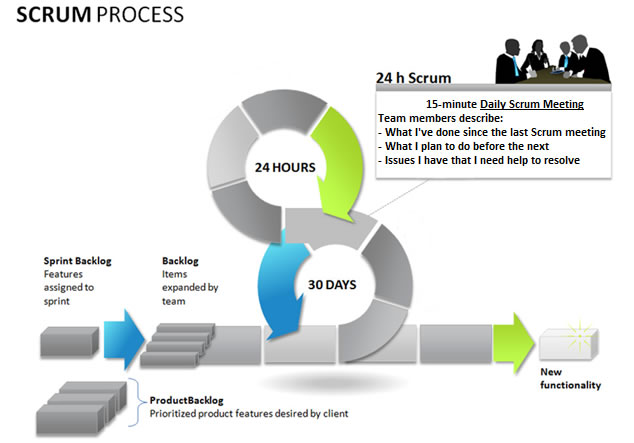
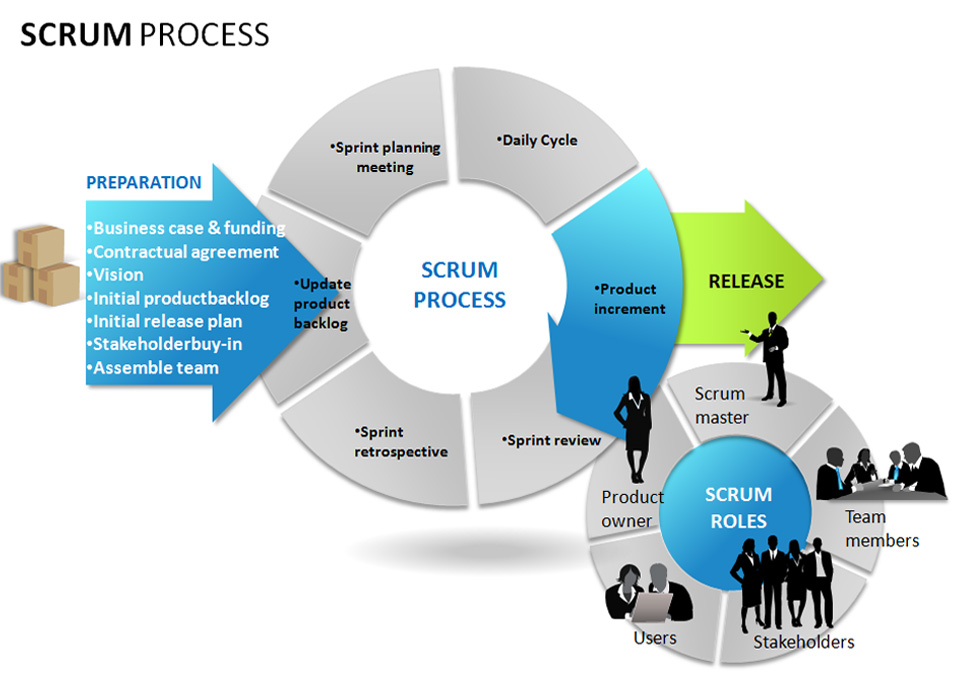
scrum development
scrum process
Agile development refers to any development process that is aligned with the concepts of the Agile Manifesto. The Manifesto was developed by a group fourteen leading figures in the software industry, and reflects their experience of what approaches do and do not work for software development.

The Manifesto says:
We are uncovering better ways of developing software by doing it and helping others do it. Through this work we have come to value:
Individuals and interactions over processes and tools
Working software over comprehensive documentation
Customer collaboration over contract negotiation
Responding to change over following a plan
That is, while there is value in the items on the right, we value the items on the left more. The agile philosophy holds that the best way to meet customer needs is through the collaboration of a committed group of people, who focus on achieving results quickly, with as little process overhead as possible.
A key element of this philosophy is that we must trust people and their ability to collaborate, more than we trust any particular process. This principle follows from the fact that people can succeed without a formal process, but no process can succeed without people. For this reason, we should design an agile process that best taps the abilities of team members by emphasizing collaboration, rather than relying on the structure of a process to guarantee success.
The Agile Manifesto does not specify any particular practices that a development team should follow. Specific agile process frameworks, such as Scrum and XP, do define practices that must be followed.

A Deeper Look Into Scrum

 Benefits of Scrum
The benefits are different for different people.

Benefits to Customer

Customers find that the vendor is more responsive to development requests. High-value features are developed and delivered more quickly with short cycles, than with the longer cycles favored by classic “waterfall” processes.
p

Benefits to Vendors

Vendors reduce wastage by focusing development effort on high-value features, and reduce time-to-market relative to waterfall processes due to decreased overhead and increased efficiency. Improved customer satisfaction translates to better customer retention and more positive customer references.

Benefits to Development Teams

Team members enjoy development work, and like to see their work used and valued. Scrum benefits Team members by reducing non-productive work (e.g., writing specifications or other artifacts that no one uses), and giving them more time to do the work they enjoy. Team members also know their work is valued, because requirements are chosen to maximize value to customers.

Benefits to Product Managers

Product Managers, who typically fill the Product Owner role, are responsible for making customers happy by ensuring that development work is aligned with customer needs. Scrum makes this alignment easier by providing frequent opportunities to re-prioritize work, to ensure maximum delivery of value.

>Benefits to Project Managers

Project Managers (and others) who fill the ScrumMaster role find that planning and tracking are easier and more concrete, compared to waterfall processes. The focus on task-level tracking, the use of Burndown Charts to display daily progress, and the Daily Scrum meetings, all together give the Project Manager tremendous awareness about the state of the project at all times. This awareness is key to monitoring the project, and to catching and addressing issues quickly.

Benefits to PMOs and C-Level Executives

Scrum provides high visibility into the state of a development project, on a daily basis. External stakeholders, such as C-Level executives and personnel in the Project Management Office, can use this visibility to plan more affectively, and adjust their strategies based on more hard information and less speculation.

Scrum differs from traditional “waterfall” approaches to project management in many ways, but is based on sound project-management principles.

Requirements

Scrum does not define just what form requirements are to take, but simply says that they are gathered into the Product Backlog, and referred to generically as “Product Backlog Items,” or “PBIs” for short. Given the time-boxed nature of a Sprint, we can also infer that each set should require significantly less time to implement than the duration of the Sprint. Most Scrum projects borrow the “XP” (Extreme Programming) practice of describing a feature request as a “User Story,” although a minority uses the older concept of a “Use Case.” We will go with the majority view here, and describe three reasonably-standard requirements artifacts found in Product Backlogs.

User Story

A User Story describes a desired feature (functional requirement) in narrative form. User Stories are usually written by the Product Owner, and are the Product Owner’s responsibility. The format is not standardized, but typically has a name, some descriptive text, references to external documents (such as screen shots), and information about how the implementation will be tested.
For example, a Story might resemble the following:

Name: Planner enters new contact into address book, so that he can contact the person later by postal or electronic mail
Description: Planner enters standard contact information (first and last name, two street address lines, city, state, zip / postal code, country, etc.) into contact-entry screen. He clicks “Save” to keep the data, and “Cancel” to discard data and return to previous screen.
Screens and External Documents: http://myserver/screens/contact-entry.html
How to test: Tester enters and saves the data, finds the name in the address book, and clicks on it. He sees a read-only view of the contact-entry screen, with all data previously entered.

The elements in this User Story are:
  1. Name: The Name is a descriptive phrase or sentence. The example uses a basic “Role-Action-Reason” organization. Another common style, popularized by Mike Cohn, follows the template “As a <type of user>, I want <some goal> so that <some reason>.” The choice of template is less important than having a workable standard of some kind.
  2. Description: This is a high-level (low-detail) description of the need to be met. For functional (user-facing) requirements, the description is put in narrative form. For non-functional requirements, the description can be worded in any form that is easy to understand. In both cases, the key is that the level of detail is modest, because the fine details are worked out during the implementation phase, in discussions between team members, product owners, and anyone else who is involved. (This is one of the core concepts of Scrum: Requirements are specified at a level that allows rough estimation of the work required to implement them, not in detail.)
  3. Screens and External Documents: If the Story requires user-interface changes (especially non-trivial ones), the Story should contain or link to a prototype of the changes. Any external documents required to implement the Story should also be listed.
  4. How to test: The implementation of a Story is defined to be complete if, and only if, it passes all acceptance tests developed for it. This section provides a brief description of how the story will be tested. As for the feature itself, the description of testing methods is short, with the details to be worked out during implementation, but we need at least a summary to guide the estimation process.
There are two reasons for including the information about how to test the Story. The obvious reason is to guide development of test cases (acceptance tests) for the Story. The less-obvious, but important, reason, is that the Team will need this information in order to estimate how much work is required to implement the story (since test design and execution is part of the total work).

Story

Not all requirements for new development represent user-facing features, but do represent significant work that must be done. These requirements often, but not always, represent work that must be done to support user-facing features. We call these non-functional requirements “Technical Stories.”
Technical Stories have the same elements as User Stories, but need not be cast into narrative form if there is no benefit in doing so.
Technical Stories are usually written by Team members, and are added to the Product Backlog. The Product Owner must be familiar with these Stories, and understand the dependencies between these and User Stories in order to rank (sequence) all Stories for implementation.

Defect

A Defect, or bug report, is a description of a failure of the product to behave in the expected fashion. Defects are stored in a bug-tracking system, which may or may not be physically the same system used to store the Product Backlog. If not, then someone (usually the Product Owner) must enter each Defect into the Product Backlog, for sequencing and scheduling.

Roles

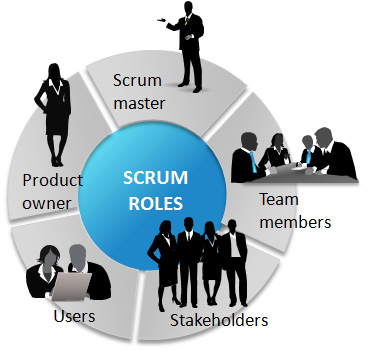
The three roles defined in Scrum are the ScrumMaster, the Product Owner, and the Team (which consists of Team members). The people who fulfill these roles work together closely, on a daily basis, to ensure the smooth flow of information and the quick resolution of issues.

ScrumMaster

The ScrumMaster (sometimes written “Scrum Master,” although the official term has no space after “Scrum”) is the keeper of the process. He is responsible for making the process run smoothly, for removing obstacles that impact productivity, and for organizing and facilitating the critical meetings.
scrum roles
The ScrumMasters responsibilities include
  • Removing the barriers between the development Team and the Product Owner so that the Product Owner directly drives development.
  • Teach the Product Owner how to maximize return on investment (ROI), and meet his/her objectives through Scrum.
  • Improve the lives of the development Team by facilitating creativity and empowerment.
  • Improve the productivity of the development Team in any way possible.
  • Improve the engineering practices and tools so that each increment of functionality is potentially shippable.
  • Keep information about the Team’s progress up to date and visible to all parties.
In practical terms, the ScrumMaster needs to understand Scrum well enough to train and mentor the other roles, and educate and assist other stakeholders who are involved in the process. He should maintain a constant awareness of the status of the project (its progress to date) relative to the expected progress, investigate and facilitate resolution of any roadblocks that hold back progress, and generally be flexible enough to identify and deal with any issues that arise, in any way that is required. He must protect the Team from disturbance from other people by acting as the interface between the two.
The ScrumMaster does not assign tasks to Team members, as task assignment is a Team responsibility. His general approach towards the Team is to encourage and facilitate their decision-making and problem-solving capabilities, so that they can work with increasing efficiency and decreasing need for supervision. His goal is to have a team that is not only empowered to make important decisions, but does so well and routinely.

Product Owner

The Product Owner is the keeper of the requirements. He provides the “single source of truth” for the Team regarding requirements and their planned order of implementation.
In practice, the Product Owner is the interface between the business, the customers, and their product related needs on one side, and the Team on the other. He buffers the Team from feature and bug-fix requests that come from many sources, and is the single point of contact for all questions about product requirements. He works closely with the team to define the user-facing and technical requirements, to document the requirements as needed, and to determine the order of their implementation. He maintains the Product Backlog (which is the repository for all of this information), keeping it up to date and at the level of detail and quality the Team requires.
The Product Owner also sets the schedule for releasing completed work to customers, and makes the final call as to whether implementations have the features and quality required for release.

Team

The Team is a self-organizing and cross-functional group of people who do the hands-on work of developing and testing the product. Since the Team is responsible for producing the product, it must also have the authority to make decisions about how to perform the work. The Team is therefore self-organizing: Team members decide how to break work into tasks, and how to allocate tasks to individuals, throughout the Sprint.
The Team size should be kept in the range from five to nine people, if possible. (A larger number make communication difficult, while a smaller number leads to low productivity and fragility.)
Note: A very similar term, “Scrum Team,” refers to the Team plus the ScrumMaster and Product Owner.

Next Steps with Scrum

Agile Team Definition Template:

The amount of work an Agile Team can perform in a Sprint must be known in order to plan the Sprint effectively. You can use this template to estimate the Team’s capacity for work for a particular Sprint.
First enter the Sprint duration, and the hours the whole Team spends in standard meetings and activities, to compute the best-case “free time” in which Team Members can be working on Sprint Backlog Items. Then provide each Team Member’s hours off per Sprint, and percentage availability to work on Sprint Backlog items. The template will then compute the Team’s total capacity for work in Points, or Person-Days, and the effective number of full-time employees (Net Team Resources).
When you have estimated the Team’s capacity, and estimated the size of requirements (Stories, Defects) in the Product Backlog, you can then determine which items will fit in this Sprint’s Backlog.

Agile Estimation Decks:

Estimating work is difficult to do well, and difficult to do quickly. Our estimation process leverages your team’s expertise to produce quick and accurate results. By using these estimation decks, we eliminate the problem of expert bias, and ensure that your team produces the best possible results!

Scrum Cheet Sheet

This is a great reference sheet to have on hand when thinking about Scrum or studying for the Certified Scrum Master Exam. It summarizes the Scrum Roles, Scrum Artifacts, Scrum Meetings and more. Pin it up on your wall or carry it around with you to help yourself remember the key techniques of a scrum project.
Also included:
  • Scrum Estimation Techniques
  • Scrum Tools
  • Scrum FAQ’s
  • Scrum Process
  • Glossary of Terms

Certifications

The Scrum Alliance has defined five certifications, as indicated in the chart.
The primary value of a certification is always in the opportunities it opens up for the holder.
  • Companies increasingly seek Project Managers with CSM certifications, to organize and facilitate their Scrum development teams.
  • Product Managers who have CSPO certifications are more attractive to companies that develop with Scrum, than those who don’t.
  • The CSP provides a strong statement to potential employers that the holder has deep practical experience with Scrum (as a ScrumMaster or Product Owner), and corresponding value.
  • The CSC and CST certifications are useful for firms and consultants who provide Scrum coaching and teaching services, as they confirm that the holder has strong experience in these areas. (A CST is also required for anyone who will teach a CSM or CSPO course.)
All Scrum certifications are offered by the Scrum Alliance. For information on how to apply for certifications, consult theScrum Alliance certification page.

Certified Scrum Master (CSM)

The CSM certification is the starting point for people who wish to fill the ScrumMaster role, either as their primary goal, or as a step towards other certifications. A CSM indicates that the holder has attended a CSM class, and passed the CSM exam.
After sucessfully completing ScrumMaster course, the student receives an email from the Scrum Alliance. The message contains information about membership, and how to create an online profile and take the CSM exam.
The CSM exam consists of 60 multiple-choice questions, to be answered within 60 minutes. The exam focuses on the following information (taught in the class):
  • Scrum Basics – The principles of Scrum, Scrum framework, and artifacts and roles
  • Meetings - Sprint Review, Sprint Planning Meeting, Daily Scrum, and Sprint Retrospective
  • Roles - Scrum Team, Product Owner, ScrumMaster roles and responsibilities
  • Artifacts - Product Backlog, Sprint Backlog, and Burndown charts, and how they are used
The cost of the exam is included in the cost of the ScrumMaster course. There is no exam charge for the first and subsequent attempts to pass the exam.

Certified Scrum Product Owner (CSPO)

The CSPO certification is the starting point for people who wish to fill the Product Owner role, either as their primary goal, or as a step towards other certifications.
Wednesday, October 22, 2014

Approval Process Terminology in Salesforce.


Approval Process Terminology in Salesforce.


Approval Request: An approval request is an email notifying the recipient that a record was submitted for approval and his or her approval is  requested.
Approval Steps: Approval steps assign approval requests to various users and define the chain of approval for a particular approval process.
– Each approval step specifies the attributes a record must have to advance to that approval step, the user who can approve requests for those records, and whether to allow the delegate of the approver to approve the requests.
– The first approval step in a process also specifies the action to take if a record does not advance to that step.
– Subsequent steps in the process also allow you to specify what happens if an approver rejects the request.
Assigned Approver: The assigned approver is the user responsible for approving an approval request.
Initial Submission Actions: are the actions that occur when a user first submits a record for approval.
– For example, an initial submission action can lock the record so that no users can edit it during the approval process.
– Initial submission actions can also include any approval actions such as assigning a task, sending an email, or updating a field.
Final Approval Actions: are the actions that occur when all approval requests for a record are approved.
– Final approval actions can include any approval actions such as email alerts, field updates, tasks, or outbound messages.
– For example, a final approval action can change the status to “Approved” and send a notification email.
Final Rejection Actions: are the actions that occur when all approval requests for a record are rejected.
– Final rejection actions can include any approval actions such as email alerts, field updates, tasks, or outbound messages.
– For example, a final rejection action can change the status to “Rejected”, send a notification email, and unlock the record so that users can edit it before resubmitting.
Record Locking: is the process of preventing users from editing a record regardless of field-level security or sharing settings.
– Records that are pending approval are automatically locked by Salesforce.
– Users must have the “Modify All Data” permission to edit locked records.
– The Initial Submission Actions, Final Approval Actions, and Final Rejection Actions related lists contain a record lock action that you can edit if necessary
Outbound Messages: send the information you specify to an endpoint you designate.
– You can set up workflow rules and approval processes to send outbound messages to an endpoint as a means of getting information to an external service.


Monday, October 20, 2014

Summer 14 Release Training Notes

Summer 14 Release Training Notes

For any of you certified developers needing to take the Summer 14 Release Exam to maintain your credentials, the following notes, which were taken after watching the Release training videos, should help you to prepare.

Salesforce Chatter Changes

Communities Enhancements

  • The new Community Engagement Console gives community managers one place to monitor and manage the community reputation. Administrators can select which of the 5 available dashboards (seen in the image below) are seen on each of the pages within Community Settings in Setup (Setup|Customize|Communities|Settings).
CommunitiesConsole
  • There are now new report types for reporting on Communities. They are:
    • Network Membership Daily Metrics
    • Network Activity Daily Metrics
    • Network Unique Contributor Daily Metrics
    • Network Tenant Usage Entitlement Weekly Metrics
  • There is also a new App that will be released soon on the AppExchange called Salesforce Communities Analytics
  • The new Reputation Levels and Point Values tabs allows managers to gamify member’s involvement by assigning them points depending on how they contribute. For example, a member can get a certain number of points for writing a post or comment, but even more when someone shares their post. The manager can determine how many points members earn and a certain reputation level that they also define. Administrators enable reputation for communities through Setup|Customize|Communities|Manage Communities.
  • Administrators can now enable Chatter access without login through a Communities Miscellaneous Settings, which means that users without a license can still access the Communities Public Groups and Feeds.

Sales Cloud Changes

Price Book Entry Enhancements

  • Price book entries are now customizable. They can now create custom fields, validation rules and customize layouts for price books. Access through Setup|Build|Customize|Price Books|Price Book Entries (New item).
  • For customers that store and manage products from another system, you can create a custom field on price book entry to store the external id for the pricing record.
  • Prior to this release the only way to interact with the price book entry was via multi-line add/edit pages on the Product and Price Book Detail pages.

Opportunity Split Enhancements

  • Opportunity Splits are now customizable. These offer a great way to associate credit to multiple sales team members working on a deal.
  • Administrators can add custom split types based on Opportunity currency field for Developer, Unlimited and Performance editions.

Activities Enhancements

  • There is now a Default New Event Publisher action available in new organizations. Users can now create events from the Home, Chatter, record detail pages and in Salesforce1 without Admin setup.
  • Activity date or date and time can be used in validation rules and custom formula fields.
  • New Activity Relationship object
  • Status and Related To columns in task lists
NewEvent

Salesforce for Outlook Enhancements

  • Side panel is now available to all users
  • Users can create more records using the Side Panel Publisher
  • Refresh token policies can be set to expire after a certain period of time

Service Cloud Changes

Case Feed Enhancements

  • The Case feed is no longer fixed and can now be changed. But Admins must enable this through Setup|Customize|Cases|Page Layouts|Case Feed Layout|Edit Feed View.

Salesforce Console for Service Enhancements

  • There is a new Related List Component that can be added the to the page layout of any object within the console.
  • There is also a new Interaction Log buttons, such as Add Call Data which allows agents to manually select which interaction log a particular call should be associated with. The Clear Log button allows users to clear the log in a single click.
  • Users can save the settings of their mutli-components between refreshing screens, logging in and out and changing between tabs.

Live Agent Enhancements

  •  Agents and customers can now transfer and upload files during a chat
  • The Knowledge One widget has replaced the Live Agent article tool, which gives agents better access to articles they can share with customers in one click.

Analytics Changes

  • Admins can now mass delete public reports through Setup|Data Management|Mass Delete Records|Mass Delete Reports.
  • They can also enable historical trending for forecasting items using Collaborative fields so you can build reports that highlight forecast changes between up to 5 snapshot dates.
  • Can also track historical changes using lookup fields when doing Historical Trending.

Mobile Changes

  • You can now use Salesforce1 on a Blackberry browser on Blackberry Z10 and the Good Access secure mobile browser on Android 4.2 or later and on Apple mobile devices with iOS 7 or later.
  • You can now create and access publisher actions even if Chatter is not enabled
  • Users can now drill down to reports and record from dashboards and see up to 200 list views

Force.com ChangesNewUsersSection

  • Until Summer 14, Manage Users was the only way to grant certain user management permissions. But now, there are 8 new permissions under the new Users section (see image).
  • Previously the Sharing button was available on all user detail pages where User Sharing is enabled. But now, Admins can enable or disable this button via the User Visibility section of the Sharing Settings page.


Sunday, October 19, 2014

Top 5 Tips for Improving Visualforce Pages

Top 5 Tips for Improving Visualforce Pages

1 – Reduce or eliminate view state
2 – Evaluate SOQL for Efficiency
3 – Reduce use of Action tags
4 – Take Advantage of StandardSetControllers when dealing with lists of data
5 – Incorporate Best Practices with all JavaScript, CSS and Images


for reference :
http://saramorgan.net/2014/07/14/top-5-tips-for-improving-visualforce-pages/


Friday, October 17, 2014

Developer Interview Question and Answer Part 2

Developer Interview Question and Answer Part 2

Q). Variable and Method Access Modifiers
• Link classes, methods and variables have different levels depending on the keywords used in the declaration.
– private: This method/variable is accessible within the class it is defined.
– protected: This method/variable is also available to any inner classes or subclasses. It can only be used by instance methods and member variables.
– public: This method/variable can be used by any Apex in this application namespace.
– global: this method/variable is accessible by all Apex everywhere.
• All methods/variable with the webService keyword must be global.
– The default access modifier for methods and variables is private.

Q). Casting

Apex enables casting: A data type of one class can be assigned to a data type of another class, but only if one class is a child of other class.
• Casting converts an object from one data type to another.
• Casting between the generic sObject type and the specific
sObject type is also allowed.
For Example:
sObject s = new Account();
Account a = (Account)s;
Contact c = (Contact)s //this generates a run time error.

Q). Exceptions Statements

Similar to Java, Apex uses exception to note errors and other events that disrupt script execution with the following keywords:
• Throw: signals that an error has occurred and provides an exception object.
• Try: identifies the block of code where the exception can occur.
• Catch: identifies the block of code that can handle a particular exception. There may be multiple catch blocks for each try block.
• Finally: optionally identifies a block of code that is guaranteed to execute after a try block.
Exception Example:
public class OtherException extends BaseException {}
Try{
//Add code here
throw new OtherException(‘Something went wrong here…’);
} Catch (OtherException oex) {
//Caught a custom exception type here
} Catch (Exception ex){
//Caught all other exceptions here
}

Q). Exception Methods

All exceptions support built-in methods for returning the error message and exception type, below is the some of the Exception Methods,
AsyncException
CalloutException
DmlException
EmailException
JSONException
ListException
MathException
NoAccessException
NoDataFoundException
NullPointerException
QueryException
http://www.salesforce.com/us/developer/docs/apexcode/Content/apex_classes_exception_methods.htm

Q). Loops

• Apex supports the following five types of procedural loops:
– do {statement} while (Boolean_condition);
– while (Boolean_condition) statement;
– for (initialization; Boolean_exit_condition; increment) statement;
– for (variable : array_or_set) statement;
– for (variable : [inline_soql_query]) statement;
• All loops allow for loop control structures:
– break; exits the entire loop
– continue; skips to the next iteration of the loop


Developer Interview Question and Answer Part 1? Apex Interview Questions.

Q). What is Apex in Salesforce?

• Apex is a procedural scripting language in discrete and executed by the Force.com platform.
• It runs natively on the Salesforce servers, making it more powerful and faster than non-server code, such as JavaScript/AJAX.
• It uses syntax that looks like Java
• Apex can written in triggers that act like database stored procedures.
• Apex allows developers to attach business logic to the record save process.
• It has built-in support for unit test creation and execution.


Apex provides built-in support for common Force.com platform idioms, including:
• Data manipulation language (DML) calls, such as INSERT, UPDATE, and DELETE, that include built-in DmlException handling


• Inline Salesforce Object Query Language (SOQL) and Salesforce Object Search Language (SOSL) queries that return lists of sObject records


- Looping that allows for bulk processing of multiple records at a time
- Locking syntax that prevents record update conflicts
- Custom public Force.com API calls that can be built from stored Apex methods
- Warnings and errors issued when a user tries to edit or delete a custom object or field that is referenced by Apex

Note: Apex is included in Unlimited Edition, Developer Edition, Enterprise Edition, and Database.com

Apex vs. Java: Commonalities
• Both have classes , inheritance, polymorphism, and other common OOP features.
• Both have the same name variable, expression, and looping syntax.
• Both have the same block and conditional statement syntax.
• Both use the same object, array, and comment notation.
• Both are compiled, strongly-typed, and transactional.


Apex vs. Java: Differences
• Apex runs in a multi-tenant environment and is very controlled in its invocation and governor limits.
• To avoid confusion with case-insensitive SOQL queries, Apex is also case-insensitive.
• Apex is on-demand and is compiled and executed in cloud.
• Apex is not a general purpose programming language, but is instead a proprietary language used for specific business logic functions.
• Apex requires unit testing for development into a production environment.

Force.com Apex Code Developer’s Guide

Q). What is Visualforce in Salesforce?

Visualforce is the component-based user interface framework for the Force.com platform. The framework includes a tag-based markup language, similar to HTML. Each Visualforce tag corresponds to a coarse or fine-grained user interface component, such as a section of a page, or a field. Visualforce boasts about 100 built-in components, and a mechanism whereby developers can create their own components.
• Visualforce pages can react differently to different client browsers such as those on a mobile or touch screen device.
• Everything runs on the server, so no additional client-side callbacks are needed to render a complete view.
• Optional server-side call outs can be made to any Web service.


Visualforce is a Web-based framework that lets you quickly develop sophisticated, custom UIs for Force.com desktop and mobile apps. Using native Visualforce markup and standard Web development technologies such as HTML5, CSS, JavaScript, and jQuery, you can rapidly build rich UIs for any app.
http://wiki.developerforce.com/page/User_Interface
Visualforce Developer’s Guide

Q). Apex code Execution Governors and Limits

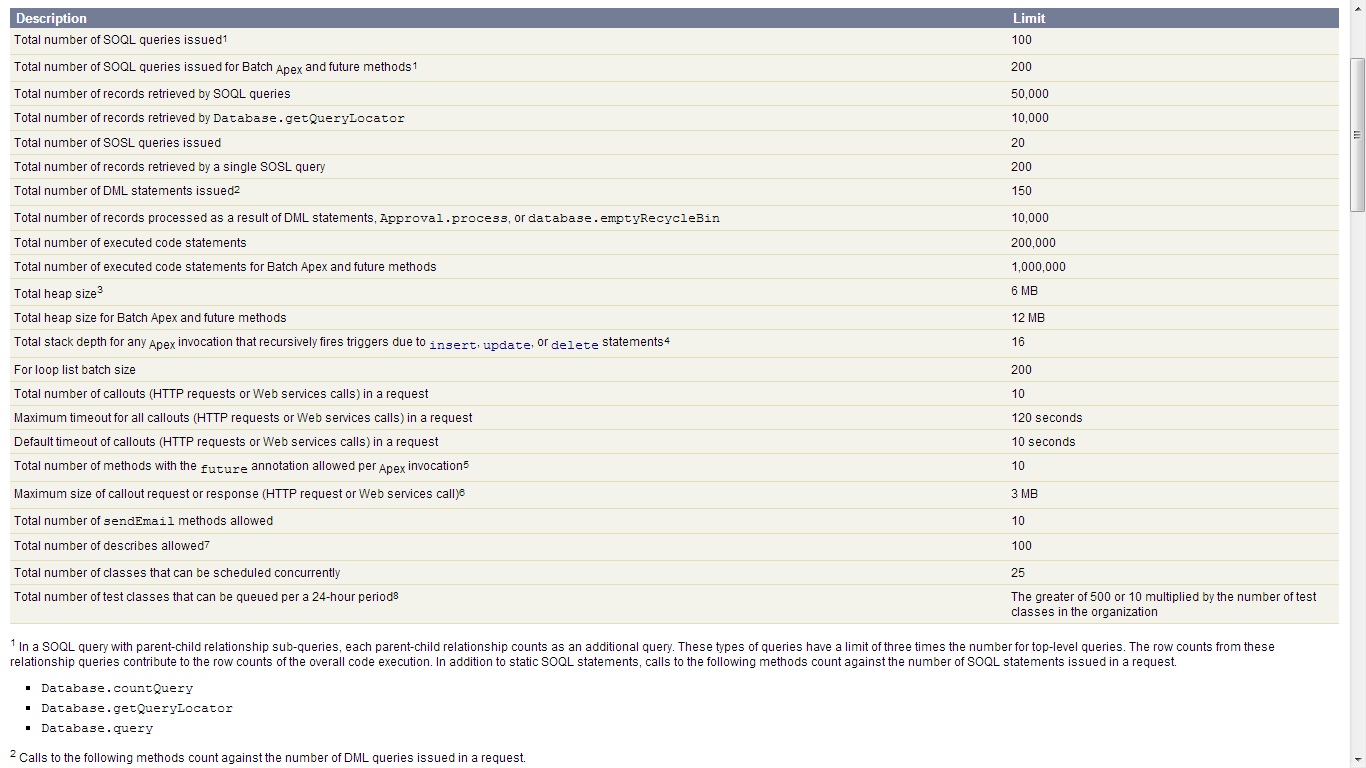
Apex-Governer-limits
This link should have more information about Apex code Execution Governors and Limits,
http://www.salesforce.com/us/developer/docs/apexcode/Content/apex_gov_limits.htm

Q). Apex Data Types

Apex primitive data types include
- String
- Blob (for storing binary data)
- Boolean
- Date, DateTime and Time
- Integer, Long, Decimal, Double
- ID (Force.com database record identifier)
– Example:
• DateTime dt = System.now() + 1;
• Boolean isClosed = true;
• String sCapsFirstName = ‘Andrew’.toUpperCase();

Apex sObject Types
- Sobject (object representing a Force.com standard or custom object)
– Example:
• Account acct = new Account(); //Sobject example

Apex has the following types of collections
- Lists
- Maps
- Sets
– Example:
• List myList = new List();
• myList.add(12); //Add the number 12 to the list
• myList.get(0); //Access to first integer stored in the List

Enums
• Enum (or enumerated list) is an abstract that stores one value of a finite set of specified identifiers.
• To define an Enum, use enum keyword in the variable declaration and then define the list of values.
• By creating this Enum, you have created a new data type called Season that can be used as any other data type.
- Example:
• public enum Season {WINTER, SPRING, SUMMER, FALL}

Q). Variables

Local variables are declared with Java-style syntax.
For example:
Integer i = 0;
String str;
Account a;
Account[] accts;
Set s;
Map<ID, Account> m;

Q). Static Methods and Variables

• Class methods and variables can be declared as static. Without this keyword, the default is to create instance methods and variables.
• Static methods are accessed through the class itself, not through an object of the class:


Example:
public class blogReaders {
public static boolean firstScript = false;
}
• Static methods are generally utility methods that do not depend on an instance. System methods are static.
• Use static variables to store data that is shared with in the class.
– All instances of the same class share a single copy of static variables.
– This can be a technique used for setting flags to prevent recursive

Q). What is the use of static variable?

When you declare a method or variable as static, it’s initialized only once when a class is loaded. Static variables aren’t transmitted as part of the view state for a Visualforce page.
Static variables are only static within the scope of the request. They are not static across the server, or across the entire organization.

Q). Final variables

• The final keyword can only used with variables.
– Classes and methods are final by default.
• Final variables can only be assigned a value once.
– This can either be at assigned a value once.
• When defining constants, both static and final keywords should be used.
Example: public static final Integer =47;

Q). Difference between with sharing and without sharing in salesforce

By default, all Apex executes under the System user, ignoring all CRUD, field-level, and row-level security (that is always executes using the full permissions of the current user).
without sharing:
Enforcing the User’s Permissions, Sharing rules and field-level security should apply to the current user.
For example:
public with sharing class sharingClass {
// Code here
}

without sharing:
Not enforced the User’s Permissions, Sharing rules and field-level security.
For example:
public without sharing class noSharing {
// Code here
}

Enforcing the current user’s sharing rules can impact: (with sharing)
SOQL and SOSL queries – A query may return fewer rows than it would operating in system context.
DML operations – An operation may fail because the current user doesn’t have the correct permissions. For example, if the user specifies a foreign key value that exists in the organization, but which the current user does not have access to.

For More info Click Here:

Q). Class Constructors

• A constructor is a special method used to create(or instantiate) an object out of a class definition.
– Constructors never have explicit return types.
– Constructors have the same name as the class.
• Classes have default, no-argument, public constructor if no explicit constructors is defined.
– If you create a constructor that takes arguments and still want a noargument constructor, you must explicitly define one.
• Constructors can be overloaded, meaning you can have multiple constructors with different parameters, unique argument lists, or signatures.
• Constructors are called before all other methods in the class.

For Example:
public class TestObject2 {
private static final Integer DEFAULT_SIZE = 10;
Integer size;
//Constructor with no arguments
public TestObject2() {
this(DEFAULT_SIZE); // Using this(…) calls the one argument constructor
}
// Constructor with one argument
public TestObject2(Integer ObjectSize) {
size = ObjectSize;
}
}
New objects of this type can be instantiated with the following code:
TestObject2 myObject1 = new TestObject2(42);
TestObject2 myObject2 = new TestObject2();

Q). Class Access Modifiers

• Classes have different access levels depending on the keywords used in the class definition.
global: this class is accessible by all Apex everywhere.
• All methods/variables with the webService keyword must be global.
• All methods/variables dealing with email services must be global.
• All methods/variables/inner classes that are global must be within an global class to be accessible.

public: this class is visible across you application or name space.
private: this class is an inner class and is only accessible to the outer class, or is a test class.
• Top-Level (or outer) classes must have one of these keywords.
– There is no default access level for top-level classes.
– The default access level for inner classes is private.

protected: this means that the method or variable is visible to any inner classes in the defining Apex class. You can only use this access modifier for instance methods and member variables.
To use the private, protected, public, or global access modifiers, use the following syntax:
[(none)|private|protected|public|global] declaration


| ,